
NFC · NDEF · writable
Your phone as a writable NFC tag
A writable NFC memory card makes your Android phone a standard NFC tag that readers can also write to – a check-in desk, a smart-home reader or another phone with an NFC app. What is written stays on your phone, encrypted. You see every write and can go back to the original content at any time.
- Readers can write to it
- Stored encrypted on your phone
- Write history and restore
The steps in the app
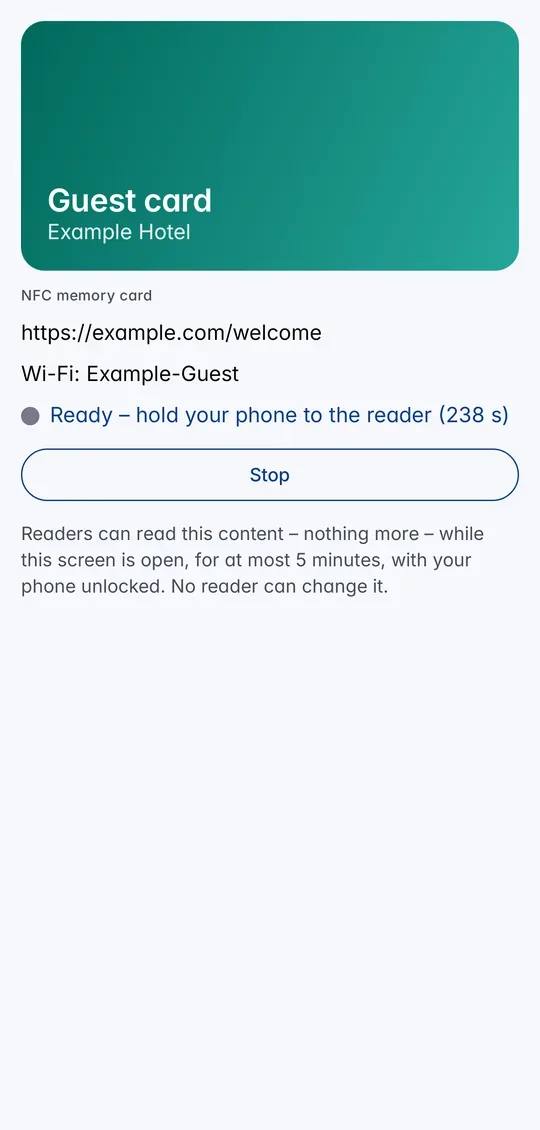
1Tap Use at reader and hold the phone to the reader. 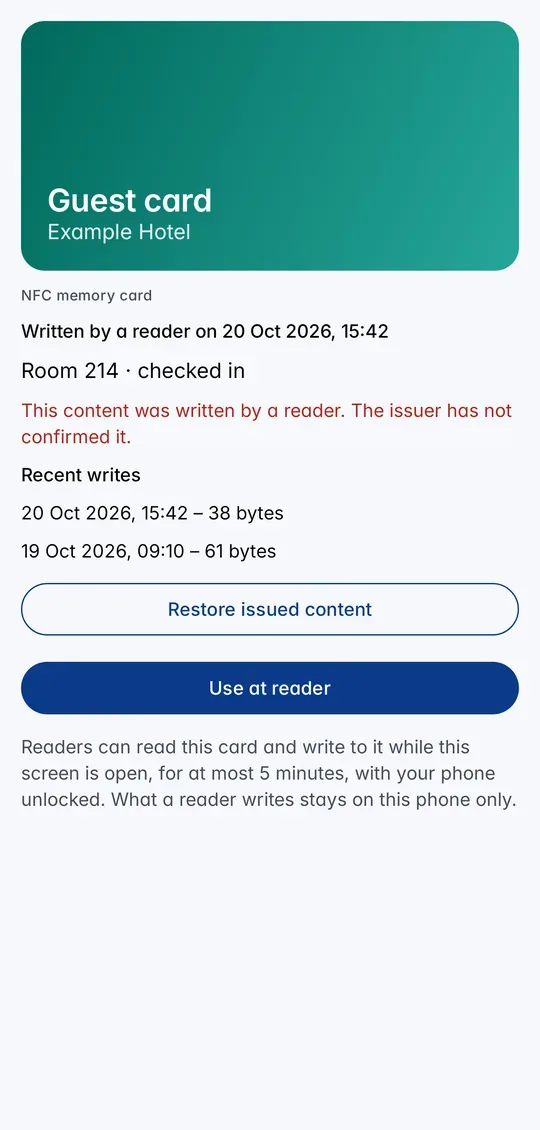
2See what was written and restore the original if you like.
What is a writable NFC tag?
Like a rewritable NFC sticker, but in your phone: readers read the content in the open NDEF format of the NFC Forum and can store new content with the standard NFC write procedure (NFC Forum Type 4 tag).
Your organisation decides how much fits (from 128 bytes to about 4 KB) and whether the card starts empty or with content, for example a link.
What it is good for
A reception desk writes your room or locker number, an event entrance writes a stamp, a workshop machine writes the last setting, or a smart-home setup writes a tag ID – and the next reader reads it back from your phone.
Any NFC app that writes standard tags works too, for example NFC Tools on another phone: choose Write and hold the phones together.
What you need
An Android phone with NFC and CodeB Wallet, and a writable NFC memory card from your organisation. Organisations create it on phone.codeb.io as a card template with the function “NFC memory card” and the write option “readers may write”.
How to use it
- Accept the invitation from your organisation. The writable NFC memory card appears in your wallet.
- Open the card and tap Use at reader – or Hold to reader when the card is in front on the home screen.
- Hold your phone to the reader or the other phone and keep it unlocked while it reads or writes.
- Check the result in the card: what was written, when, and the list of recent writes. Tap Restore issued content to go back.
Where the written content goes
What a reader writes is kept only on your phone, encrypted with a key in the phone’s secure hardware. It is not sent to your organisation or to us.
The card then shows Written by a reader with the date, the content, and the note that the issuer has not confirmed it. Under Recent writes you see the last 20 writes with time and size.
Restore issued content throws away what readers wrote; the card answers with the original content again. Deleting the card removes the written content as well.
Only when you choose
Readers can read and write only after you tap Use at reader (or Hold to reader), for at most five minutes, and only while your phone is unlocked. At all other times nobody can read or write. Payment apps and your other cards are never affected.
A write larger than the card’s size is refused and leaves the content unchanged. Whoever reads the tag can copy it – do not store passwords on it.
Questions about the writable NFC tag
Can a reader write to my phone over NFC?
Only to a writable NFC memory card in CodeB Wallet, only while you have chosen it with Use at reader, and only while your phone is unlocked. Nothing else on your phone can be written.
Where is the written content stored?
Only on your phone, encrypted with a key in its secure hardware. It is never sent to your organisation or to CodeB.
How much can a reader write?
As much as your organisation allowed for the card – between 128 bytes and about 4 KB. Larger writes are refused.
Can I write to it with NFC Tools?
Yes. Any app that writes standard NFC tags (NDEF) works: choose Write in the app on another phone and hold the two phones together while the card is ready.
How do I undo a write?
Open the card and tap Restore issued content. The card answers with the content your organisation issued again.
Install the test version (Google Play) Closed beta: works only for invited testers who are signed in to Google Play with the e-mail address we have on our tester list.