
Access · NFC · PKOC
Your phone as a door and PC access card
With CodeB Access your organisation gives you an access card in CodeB Wallet. Choose it, hold your phone to a door or PC reader – and the door opens. The reader checks the card offline; the phone answers with the card’s signed data and a fresh signature from a key that never leaves the phone’s secure hardware.
- Works offline
- Key in secure hardware
- PKOC readers too
The steps in the app
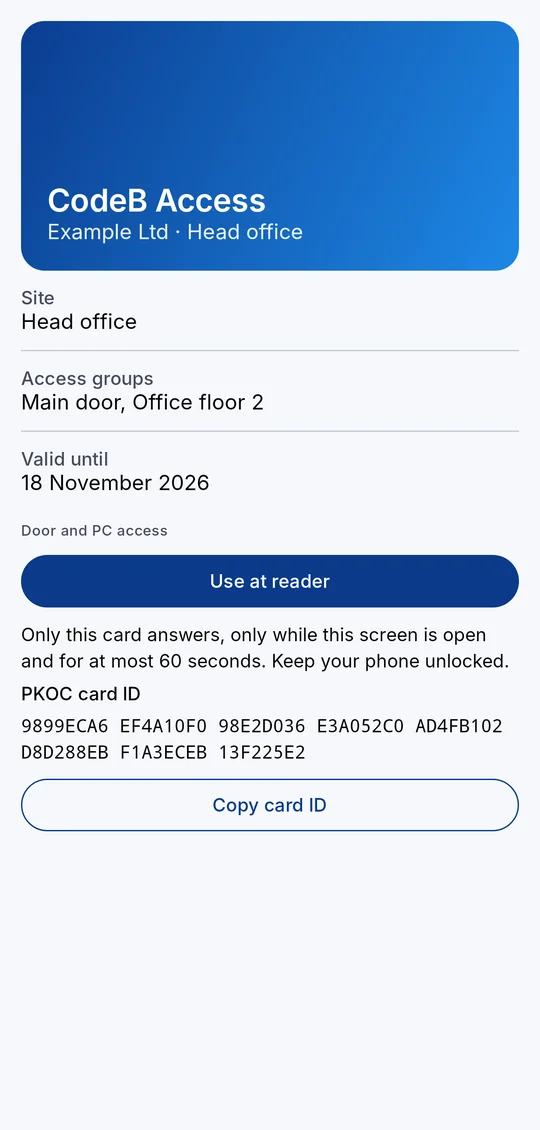
1Open the access card and tap Use at reader. 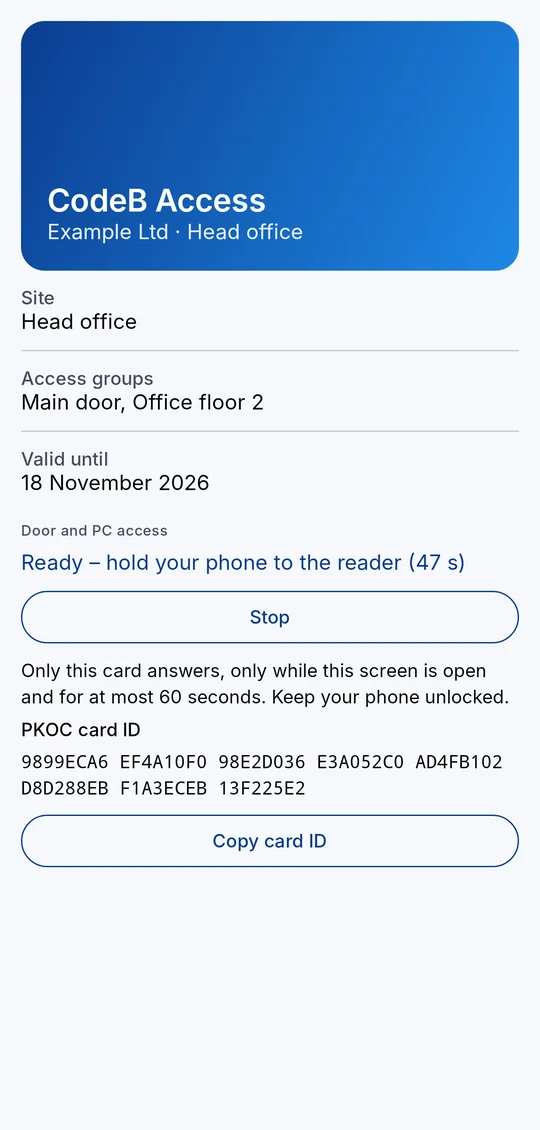
2Hold the phone to the reader while the card is ready.
What you need
An Android phone with NFC, CodeB Wallet, and an access card your organisation issues through phone.codeb.io (link, QR code or e-mail).
Door and PC access is currently being tested in closed groups.
How to open a door
- Open the invitation from your organisation and collect the CodeB Access card. It appears on your home screen.
- Before you reach the door or PC, open the card and tap Use at reader.
- Hold your phone to the reader and keep it unlocked.
- The reader checks the card offline and opens the door or signs you in. Tap Stop if you no longer need it – leaving the screen ends it as well.
What the reader learns
The reader receives only a pseudonymous card number, your sites and access groups and the validity – never your name. Every use is listed under History.
Only when you choose
Only the card you chose answers, for a short time after you choose it, and only while your phone is unlocked. At all other times your phone does not answer any access reader – and it never interferes with payment apps or your other cards.
PKOC door readers
Door readers of the open PKOC standard (Public Key Open Credential, PSIA) work as well. Your organisation enrols the PKOC card ID shown on the card; tap Copy card ID to send it. The ID is a public key – the matching private key never leaves your phone’s secure hardware.
Lost your phone?
Your organisation revokes the card and can give you a new one on your new phone.
Questions about the phone as an access card
Can my Android phone replace my access badge?
Yes, with a CodeB Access card from your organisation: open it in CodeB Wallet, tap Use at reader and hold the phone to the door or PC reader.
Does it work without internet?
Yes. The reader checks the card offline; the phone answers with the card’s signed data and a fresh signature.
Does the reader learn my name?
No. It receives only a pseudonymous card number, your sites and access groups and the validity.
Does it work with PKOC readers?
Yes. Door readers of the open PKOC standard (PSIA) work: your organisation enrols the card ID shown on the card, a public key whose private key never leaves your phone.
Can it interfere with contactless payment?
No. Only the card you chose answers, for a short time and only while your phone is unlocked; at all other times your phone does not answer access readers.
Install the test version (Google Play) Closed beta: works only for invited testers who are signed in to Google Play with the e-mail address we have on our tester list.