
Passkeys · WebAuthn · ARF 3.0 Topic 11
Passkeys with pseudonyms – sign in without a password or your name
CodeB Wallet is a passkey provider for Android 14 and newer. On every website that supports passkeys, it creates a separate pseudonym – a key pair made for that website only. You sign in with your fingerprint, face or screen lock; the website never gets a password, your name or anything from your documents, and different websites cannot link your pseudonyms. This is the pseudonym function that the EU Digital Identity Wallet architecture (ARF 3.0, Topic 11) describes. CodeB Wallet itself is not certified.
- No password, no name
- One pseudonym per website
- Android 14 or newer
What a pseudonym is
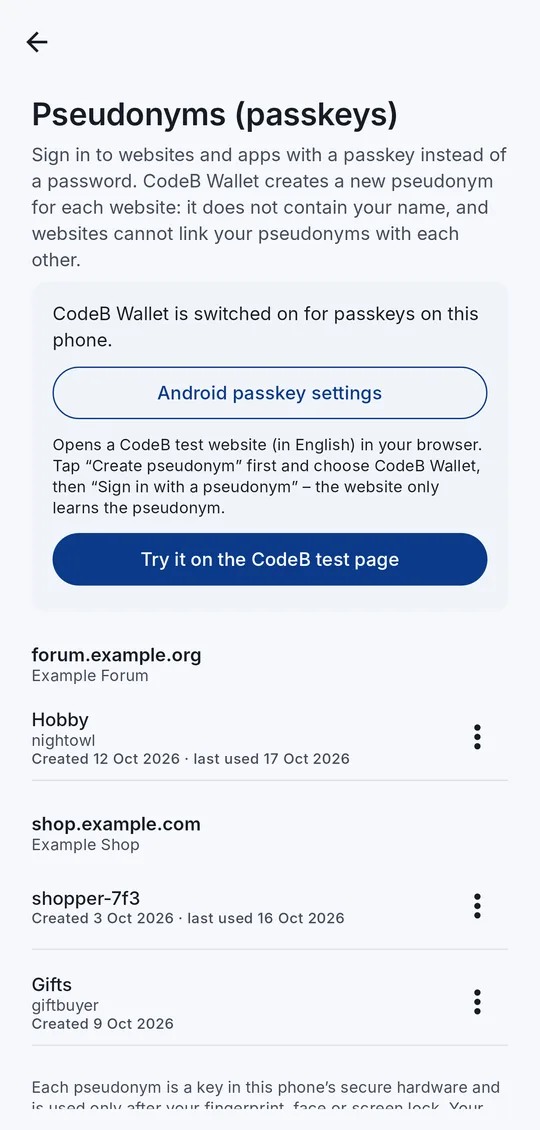
A passkey replaces the password: your phone makes a key pair, the website keeps the public key, and you sign in by confirming on your phone. CodeB Wallet makes a new key pair for every website and keeps no name, e-mail address or document data in it – that is what makes it a pseudonym.
Because each website gets a different random identifier and a different key, two websites cannot find out that the same person is behind them – not even if they compare their data.
A pseudonym signs you in again and again as the same person on that one website. It does not say who you are. When a website needs to know that – for example your age or your name – you share it from your PID, separately and only with your consent.
How to set it up and sign in
- Install CodeB Wallet on an Android phone with Android 14 or newer and set up your wallet PIN.
- Open the menu → Pseudonyms (passkeys) and tap Turn on in Android settings. In “Passwords, passkeys and accounts”, switch CodeB Wallet on.
- On a website that offers “Create a passkey”, choose CodeB Wallet in the window Android shows, and confirm with your fingerprint, face or screen lock.
- Next time, tap “Sign in with a passkey”, pick your pseudonym and confirm – no password.
- Manage your pseudonyms in the app: give one your own name, or delete it.
Make CodeB Wallet your passkey service
Android decides which app offers passkeys. Switch CodeB Wallet on once – the menu names differ slightly between phones and Android versions:
- In CodeB Wallet, open the menu → Pseudonyms (passkeys) and tap Turn on in Android settings. This opens the right Android page directly. Or open it yourself:
- Pixel and most phones (Android 14 or newer): Settings → Passwords, passkeys & accounts (on some phones “Passwords & accounts”).
- Samsung Galaxy: Settings → General management → Passwords, passkeys and autofill.
- Make it the default: tap Preferred service, choose CodeB Wallet and confirm. Android then offers CodeB Wallet first when a website asks for a passkey. Google Password Manager stays available.
- Or keep Google as default: under Additional services (or “Additional providers”), switch CodeB Wallet on. CodeB Wallet then appears in the list next to Google whenever you create or use a passkey.
- Back in CodeB Wallet, the Pseudonyms screen says “CodeB Wallet is switched on for passkeys on this phone”.
CodeB Wallet does not fill in passwords. If your phone asks you to choose one service for passwords, passkeys and autofill together, you can keep your password manager as preferred service and switch CodeB Wallet on as an additional service instead.
Try it on our test page
Our test page phone.codeb.io/pseudonym-test.html lets you try a pseudonym safely: tap Create pseudonym and choose CodeB Wallet, then tap Sign in with a pseudonym. The page only ever sees a random identifier and a public key.
When you are done, delete the pseudonym on the page and in the app.
Secure by design
Hardware key. Each pseudonym is a key in your phone’s secure hardware (StrongBox where the phone has it). It never leaves the phone and is not copied to a cloud.
Only after you confirm. Every sign-in needs your fingerprint, face or screen lock.
Bound to the website. A pseudonym works only on the website it was made for, so a fake look-alike website cannot use it. CodeB Wallet accepts the website address only from browsers it knows, refuses addresses that no single website owns, and lets other apps use a website’s pseudonyms only when that website allows the app (Digital Asset Links).
No tracking. CodeB Wallet sends no device attestation, so websites cannot recognise your phone. Creating, using and deleting a pseudonym is recorded in the app’s History.
Standards
| Standard | What CodeB Wallet does |
|---|---|
| W3C WebAuthn (passkeys) | Creates and uses discoverable passkeys with user verification; attestation “none” |
| Android Credential Manager | Registered as a passkey provider (Android 14 or newer) |
| EUDI Wallet ARF 3.0, Topic 11 | One pseudonym per website, no personal data in it, not linkable between websites |
| Digital Asset Links | Lets an app use a website’s pseudonyms only when the website allows that app |
If CodeB Wallet is not offered
“Sign in” shows only other accounts: a pseudonym appears only after you have created one on that website. Use “Create a passkey” (on our test page: “Create pseudonym”) first.
CodeB Wallet is not in the list at all: check that the phone runs Android 14 or newer and that CodeB Wallet is switched on in Android’s “Passwords, passkeys and accounts” settings. Use an up-to-date Chrome or another browser that supports passkey providers.
“No screen lock”: pseudonyms need a screen lock, so that only you can use them.
Questions about passkeys and pseudonyms
Is a pseudonym the same as a passkey?
Technically, yes: it is a passkey (W3C WebAuthn). CodeB Wallet uses it the way the EU wallet architecture describes pseudonyms – one per website, with no personal data in it, so websites cannot link you.
Does the website learn my name or e-mail address?
No. The website gets a random identifier and a public key. The account name you see in the app is the one the website chose; CodeB Wallet adds nothing from your documents.
Which websites work?
Any website that offers passkeys and lets Android choose the passkey provider. Try it on our test page: https://phone.codeb.io/pseudonym-test.html
Do I need a CodeB account or a document in the wallet?
No. Pseudonyms work without an account and without any document in your wallet.
What happens if I lose my phone?
The keys never leave the phone and are not copied to a cloud, so they cannot be stolen from a server – but they are not restored either. Sign in to the website another way, delete the old passkey there and create a new pseudonym on your new phone.
Can apps use my pseudonyms?
Only when the website allows that app in its public Digital Asset Links file. Browsers pass the website address they checked.
Install the test version (Google Play) Closed beta: works only for invited testers who are signed in to Google Play with the e-mail address we have on our tester list.