
Free · Passport or ID card · NFC
Free CodeB account – opened with your passport or ID card
Create your account on phone.codeb.io directly in CodeB Wallet: hold your passport or ID card to your Android phone, confirm your e-mail address with a code, and the account is ready – free, in about two minutes. phone.codeb.io reads the chip itself and checks that the document is genuine, so no spam account can be opened. CodeB Wallet itself is not certified.
- About two minutes
- Any passport or ID card with a chip
- 5 own signatures a day
The steps in the app
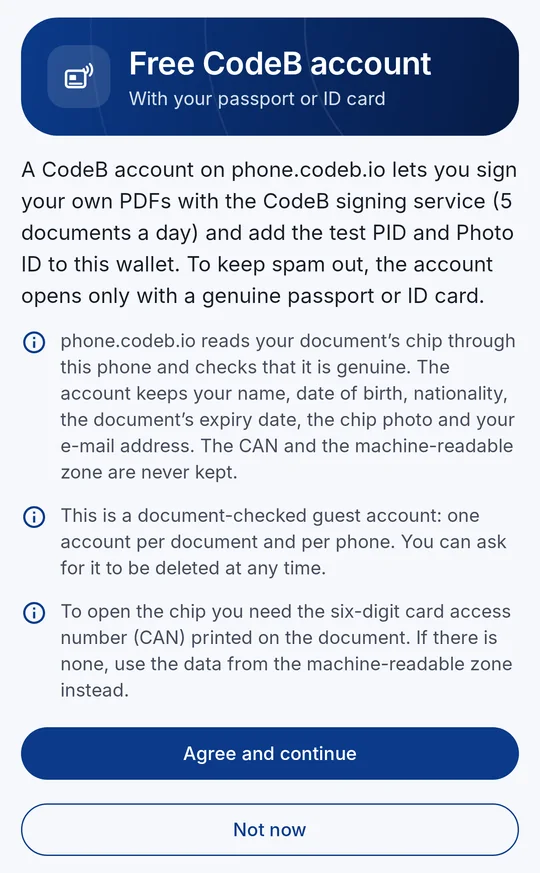
1Agree to what is checked and kept 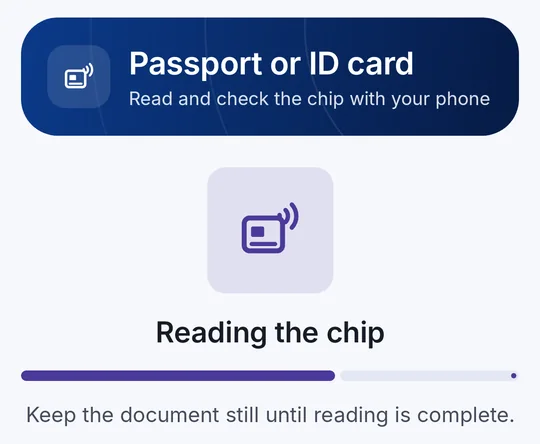
2Hold your passport or ID card to the phone 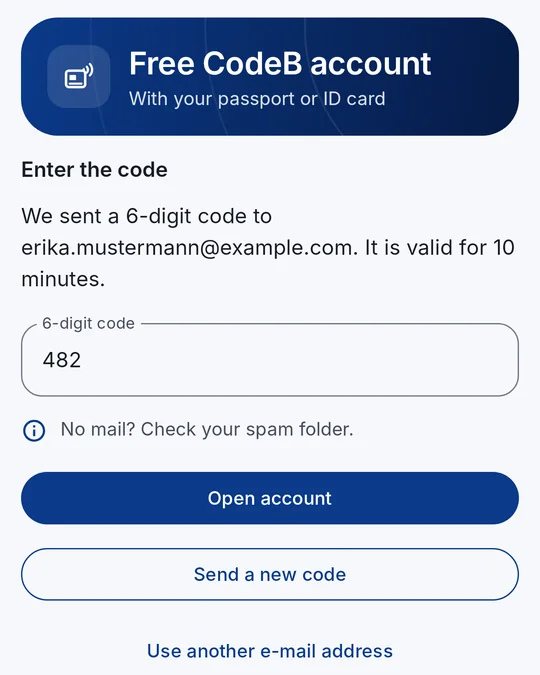
3Type the code from the e-mail 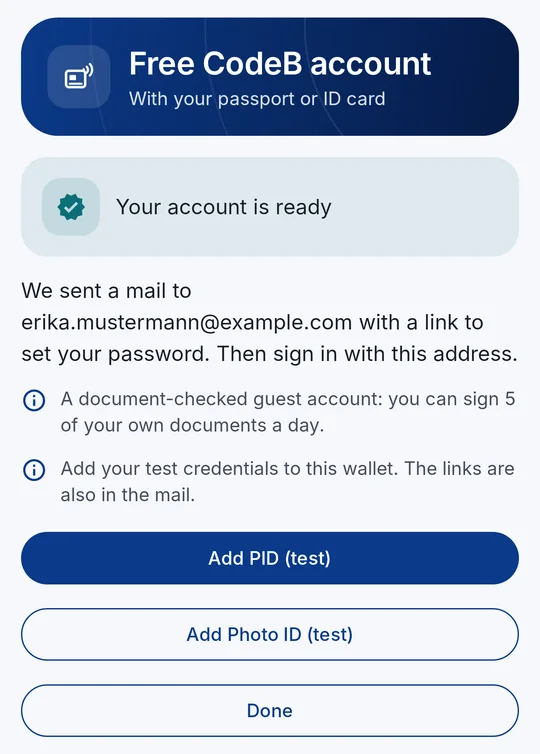
4Account ready
What the account is for
Signing your own PDFs with the CodeB signing service – 5 documents a day. Documents that someone else asks you to sign (for example from a website’s QR code) do not count. Signatures from the signing service are advanced electronic signatures (AdES).
Test PID and Photo ID: right after opening, the app offers both test credentials for your wallet.
Signing in on phone.codeb.io – to see and download documents you signed, and to answer signing requests.
Showing and checking IDs in person, and signing with your own signature card, work without an account.
How to open your free account
- Open Settings and tap Create a free CodeB account in the section “CodeB account” – or tap the link myeuid.app/open/account on your phone. You need no other card in your wallet.
- Read what is checked and kept, then tap Agree and continue.
- Enter the card access number (CAN) printed on your ID card, or scan the machine-readable zone of your passport.
- Hold the document flat against the back of your phone until the reading is finished. phone.codeb.io reads and checks the chip itself.
- When your document is confirmed as genuine, enter your e-mail address and tap Send code. The address becomes your login.
- Enter the 6-digit code from the mail and tap Open account.
- Your account is ready: open the mail and set your password with the link. Tap Add PID (test) and Add Photo ID (test) to add your test credentials.
Straight from a link
On your Android phone, the link https://myeuid.app/open/account opens the account screen in CodeB Wallet directly. It also works right after installing: set up your wallet PIN, and the app continues with the account.
Without the app, the link shows how to get it. The link only opens the screen – it carries no data and never skips your PIN.
What is checked – and why
phone.codeb.io reads the chip of your document through your phone and checks its issuing country’s signature (passive authentication) and that the chip is not a copy (chip or active authentication). An expired document cannot open an account.
Your phone also shows that it runs the genuine CodeB Wallet from Google Play on a genuine Android phone. Each document and each phone can open one account; the number of new accounts per network and day is limited.
Your face is not compared. The account therefore shows that a genuine document was held to a genuine phone – it is a document-checked guest account, not an official identity.
What is kept
Your name, date of birth, nationality, the document’s expiry date, the chip photo and your e-mail address. The CAN, the machine-readable zone and the raw chip data are never kept.
You can have the account deleted at any time. In the app, Settings → “CodeB account” opens your account on phone.codeb.io.
If something goes wrong
No mail? Check your spam folder, or tap Send a new code. A code is valid for 10 minutes.
“This document already has an account”: nothing new is opened, and that account’s address gets a notice. Sign in there, or set a new password with “Forgot password” on phone.codeb.io.
“This phone cannot be verified”: the account needs a phone that passes Android’s and Google Play’s checks, with the app installed from Google Play.
The chip cannot be read: hold the document still at the phone’s NFC antenna and remove thick cases; check the CAN, or use the machine-readable zone.
Questions about the free account
Is the CodeB account really free?
Yes. It is a guest account on phone.codeb.io with which you can sign 5 of your own PDFs a day with the CodeB signing service and get the test PID and Photo ID. Signing documents that others ask you to sign does not count towards the limit.
Which documents can I use?
Any passport or ID card with a chip that is not expired – from any country. You need the card access number (CAN) printed on the card, or the machine-readable zone of the passport.
Do I need another card in my wallet first?
No. Creating the account works on a freshly installed app with an empty wallet.
Why does an account need my passport or ID card?
To keep spam and bots out. phone.codeb.io checks the chip of a genuine document; each document and each phone can open only one account.
Is the account an official identity or a qualified signature?
No. It is a document-checked guest account: it shows that a genuine document was held to a genuine phone. Signatures from the CodeB signing service are advanced electronic signatures (AdES). CodeB Wallet itself is not certified.
Can I open the account from a link?
Yes. On your Android phone, https://myeuid.app/open/account opens the account screen in CodeB Wallet directly – also right after installing.
Can I delete the account?
Yes, at any time. In the app, Settings → “CodeB account” opens your account on phone.codeb.io.
Install the test version (Google Play) Closed beta: works only for invited testers who are signed in to Google Play with the e-mail address we have on our tester list.